
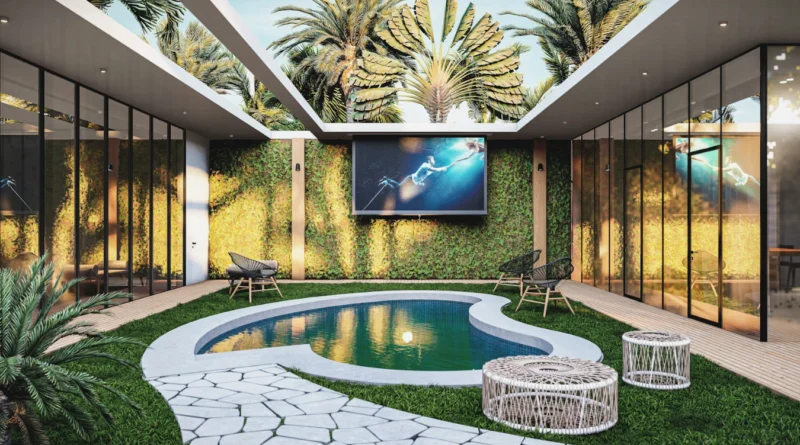
What Is Architectural Rendering and How Does It Work in Practice
Architectural rendering goes beyond just nice drawings. It stands as a key tool in today’s architecture, building, and property markets. You might be tweaking a basic idea or showing it to backers. In those cases, strong pictures can decide if a project moves forward or stalls. These visuals turn tricky space plans into something you can almost touch. And that happens well before any work starts on site.
For folks in the construction world, like designers, builders, property owners, and buyers, renderings create a common way to talk. They connect detailed plans with everyday views. Sure, flat drawings work fine for experts. But they confuse people outside the trade. Rendering fixes that. It brings clear details and a touch of creative flair.
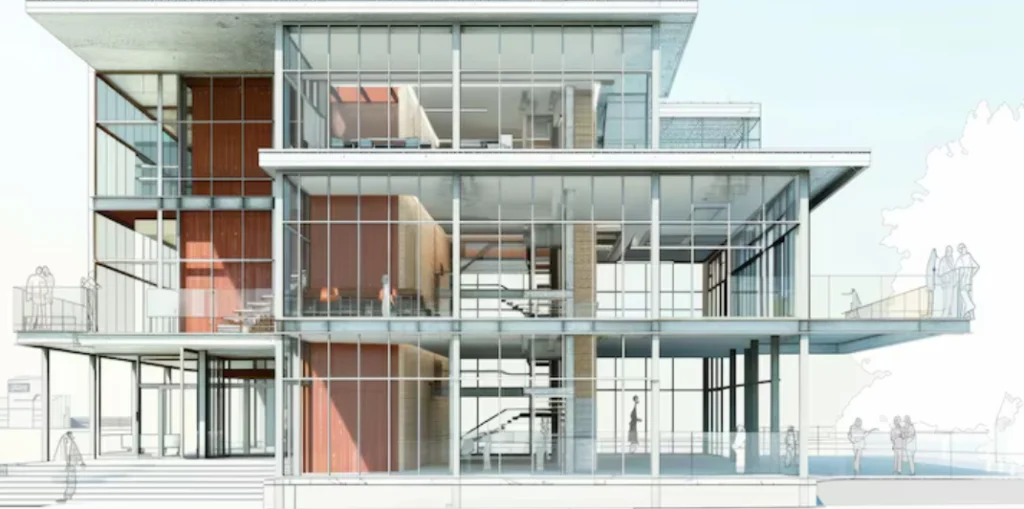
What Is Architectural Rendering?
Architectural rendering means making picture versions of building plans before the build starts. These can be quick sketches, flat drawings, or full 3D shapes. They help everyone share ideas during the planning and building steps.
Definition and Scope of Architectural Rendering
The range of architectural rendering covers lots of visual types. At heart, it shows what a structure or area will look like when done. Architects use it. So do room planners, city layout experts, and property sellers. Renderings can be exact or more artistic, based on the need. They might show light at morning or night. Or pick out fabrics and surfaces. Even how people flow through spots.
Computers lead the way now. But old methods like water paints or pen drawings still pop up in special cases. Digital or by hand, they tell a story in pictures. This guides talks and choices. I recall a small firm once using a simple hand sketch to win over a tough client. It added that personal touch machines can’t match.
Key Types of Architectural Rendering
No single kind fits all. Each type has its own aim. Outside views spotlight the front of the building and its surroundings. Inside views check how areas feel and work. Bird’s-eye shots show how it fits in the city. Videos and walk-throughs give a moving feel that still photos miss.
Some let you join in. Live engines allow strolling through on a display or in VR gear. Others are fixed high-clear pictures for flyers or permit files. Pick based on money, time, and who sees it. For example, a developer might spend extra on a shiny exterior shot to attract buyers fast.
Historical Evolution of Rendering Techniques
Rendering changed a lot in the last hundred years. Back then, builders used pen views with ink shades or water colors for feel and space. Those took hard work and varied by artist. But they often looked stunning.
Computers came in during the 1980s with CAD tools. By the 1990s, computer images got much sharper quick. Now, smart programs and engines like V-Ray, Corona Renderer, and Unreal Engine make pictures almost like real photos.
These days, you can mimic not only looks but the whole feel. Think sun light through windows. Or how rough spots change with lamps. Even plants shifting by season. It’s wild how far we’ve come—from pencils to pixels in just a few decades.
How Does Architectural Rendering Work in Practice?
The steps to render aren’t as easy as one click. They mix tech building, creative choices, and team tweaks. All this leads to a final picture or clip that matches the main plan.
Workflow from Concept to Final Render
Everything begins with basic shapes. These come from CAD files or BIM setups in programs like Revit or Rhino. They build the solid frame for the render.
With shapes set, add surface covers. Use patterns that copy rock, iron, clear panes, timber, and more. Set lights to match daily scenes. Like sun spots or room bulbs. Plus soft glows from walls.
Next, pick view points to show main parts well. Then, in the end stage, adjust colors. Blend in backgrounds. And polish with apps like Photoshop or After Effects. A pro tip from my chats with renderers: always save versions at each step. It saves headaches if a client wants big changes later.
Tools and Software Used by Professionals
Experts use a mix of programs based on the job. Autodesk 3ds Max with V-Ray is a go-to for top visuals. SketchUp shines for first ideas because it’s simple.
Other favorites are Blender for free options, Lumion for quick views, Enscape for BIM links, and Twinmotion for VR files. In BIM teams, Revit works smooth with visual tools. This lets quick fixes when plans shift.
Online services grow for team work and speed. They help on tight projects where your own computer falls short. Picture a team in New York and London sharing a model live—cloud makes it possible without email chaos.
Role of Specialists in the Rendering Process
Rendering takes more than tech skills. It’s about telling a story with pictures that stay true to facts. Visual creators turn plans into feelings that hit home. Yet they keep sizes, shapes, and covers spot on.
They team up tight with designers to nail details. And they redo work often from group input. Bosses help too. They match times between creators, picture makers, and buyers. This matters when outside dates press hard. In one project I heard about, a specialist caught a lighting flaw early. Saved the team weeks of fixes.
Why Is Architectural Rendering Important in the Design Process?
It’s not only about good looks. Architectural rendering helps big in sharing plans, selling ideas, and making smart calls.
Enhancing Communication with Stakeholders
Few people read plans like pros. Renderings make space ideas easy for buyers, funders, workers, and town leaders to get. A real-like picture says more than hard words.
This cuts mix-ups that cost money later. In plan checks, groups decide quicker when they see options in real spots. For instance, showing two window styles side by side can end debates in minutes.
Supporting Marketing and Project Approval Efforts
Top renderings serve inside and out. Property teams use them to sell spots before digging starts. Town offices ask for real photos in permit steps to check city fit.
In bids for big jobs, like roads or office towers, pictures set one plan apart with strong stories. I’ve seen a basic render turn a so-so proposal into a winner. It just needed that visual pop.
Facilitating Design Iteration and Refinement
Plans change over time. Renderings let testers try covers, fronts, or setups without real builds.
Live tools allow buyers to roam a fake space right away. They give thoughts on the spot. This cuts shocks later. And lowers questions during builds. About 70% of changes happen early with good visuals, from what pros say.

What Are the Technical Foundations Behind Photorealistic Rendering?
To make pictures that fool the eye, software copies light moves in real spots. And how covers react to it.
Principles of Light Simulation in CGI Environments
True looks depend on good light copies. Full light math tracks bounces across the area. Ray tracing follows light lines from start to end. It figures reflects or bends on covers.
HDRI setups add real light wraps. These use wide photos from actual places for better feel. It’s like bringing the sun inside your computer.
Importance of Material Mapping and Texturing Accuracy
Patterns count like lights. Real-based systems use true info. Things like rough charts or shine backs to match surface acts under beams.
Sharp patterns help close looks. Like tree lines or stone swirls. Mapping lines them right on odd shapes. No twists that spoil the real feel. Skip this, and a grand hall looks cheap.
Impact of Hardware Performance on Output Quality and Speed
Picture making eats power. Card boosts changed it all. Units from NVIDIA or AMD give live peeks that once took days on old chips.
Strong machines slash wait times. Cloud spots scale for big jobs needing fast many files. A single frame might take 10 hours on a basic setup, but drops to minutes with good gear.
How Does Real-Time Rendering Differ from Traditional Methods?
Live rendering cares more for quick moves than perfect looks. It runs VR trips and walk-arounds that let folks check areas hands-on.
Key Characteristics of Real-Time Rendering Engines
Tools like Unity, Unreal Engine, or Twinmotion use fast draw methods over ray paths. This makes frames pop as you shift. Great for show-and-tells. But not for fancy stills where sharp beats fast.
They add move math, light shifts, or item changes. All handy in plan talks. You can flip a room color live and see the vibe change.
Benefits in Design Presentation and Client Engagement
Buyers enjoy roaming a build-ahead spot. On screen or in gear, it pulls them in. And speeds thoughts back.
Makers test picks right there. With watchers. Choose floors or paints without off-line waits. It’s like a virtual show home—clients leave excited.
Limitations Compared to Offline Rendering Techniques
Live tools lack in top realness. Tricky shades or see-through spots act off from power caps.
For end boards or web prints at full size, old ways win. They give the detail that sells. But hey, for quick client chats, live is unbeatable.
What Are the Challenges Facing Architectural Visualization Today?
Tech races ahead. So do wants. From VR asks to handling huge files on low funds.
Balancing Realism with Artistic Interpretation
Too real can lock ideas early. When plans still bend. A soft paint style might share the feel better. Without firm picks.
Match the look to the crowd. Town groups like facts. Room pros want mood hints. It’s a juggle—too stiff, and it bores; too loose, and it confuses.
Managing File Complexity and Data Interoperability
BIM files bulk up quick. Pulling them to picture apps slows if not trimmed. Switches lose shapes or patterns without set types like FBX or IFC.
Use them steady across tools. One mismatch, and hours vanish fixing glitches. Teams lose days this way, especially with big city projects.
Ensuring Cost Efficiency Without Sacrificing Quality
Great sights need time, skill, and strong machines. All cost a bundle. Small shops send out work. But check quality over miles and tongues.
Money limits clip lengths or sharpness. Cut too deep, and the plan looks wrong. Balance is key—maybe skip fancy fog for clear views that matter.
How Is the Future of Architectural Rendering Being Shaped by Technology?
New tech trends shift steps. From smart auto helps to mixed real trips that change how groups see empty spots.
Integration of Artificial Intelligence in Visualization Workflows
AI cuts waits everywhere. It cleans rough pictures fast. Makes patterns from little starts. Even tweaks lights by learning from old jobs.
Smart makers draft quick lines from word notes. Great for first steps. Imagine typing “modern beach house” and getting a base sketch in seconds. It’s changing how solos start ideas.
Expansion Through Virtual Reality (VR) and Augmented Reality (AR)
VR gives true size feels. Stroll rooms full scale. Spots flat views miss. AR puts fake shapes on real ground with pads or HoloLens gear. Ideal for site walks with buyers.
Mixed ways layer tales. See pipe views under while eyeing finished rooms above. On a dusty lot, overlay the build—clients get the vision without blueprints.
Influence of Cloud Collaboration Platforms on Workflow Efficiency
Work from afar is normal. Cloud spots fit this. Shared files cut wrong copies. Links to time plans keep dates real for spread teams.
Cloud farms scale pictures without big buys. Perfect for multi-job shops. No more waiting for one slow machine—everyone pulls from the same pot.
FAQ
Q1: What is architectural rendering used for?
A: Architectural rendering is used to visualize building designs before construction begins. It helps communicate spatial ideas clearly to clients, investors, contractors, and approval authorities through detailed images or animations.
Q2: What software is best for architectural rendering?
A: Popular tools include Autodesk 3ds Max with V-Ray for photorealistic output, SketchUp for conceptual work, Lumion and Enscape for real-time visualization, and Blender as an open-source alternative.
Q3: How does real-time rendering differ from traditional rendering?
A: Real-time rendering prioritizes speed and interactivity using rasterization techniques while traditional methods focus on photorealism through ray tracing but require longer processing times.
Q4: Why is photorealism important in architectural visualization?
A: Photorealism enhances credibility by accurately simulating light behavior and material properties, helping clients better trust what they’re seeing aligns with real-world expectations.
Q5: Can AI help with architectural rendering?
A: Yes, AI accelerates workflows by automating tasks like denoising images or generating textures from minimal input. Some AI tools even assist in conceptual design based on text prompts or sketches.